Octoplus Full 1 Day + 100 Credits

Get the complete Octoplus toolkit in one package for a short time + 100 Octoplus Server Credits.
This license gives you access to all available modules, including:
Access Duration
1 day since the activation date
Key Information:
- This license will be tied to your PC. No dongle or box is required.
- The same license can be used on 2 PCs without switching limits.
Some operations require credits.
Activation Process
Once your payment is confirmed, you’ll receive an email with your activation code and step-by-step setup instructions.
How to Activate Digital License
Octoplus Samsung License:
Octoplus Samsung Digital License allows you to service Samsung cell phones.
Main Features:
- Decode
- Repair IMEI/Bluetooth
- Write Firmware
- Read/Calculate Codes
- Read/Write Full Flash
- Read/Write GDFS
- Flash via USB
- Read/Write/Repair NVM
- Read/Write/Repair EEPROM
- Edit Language
- Format FS
- Write/Repair Security
- Write Security Backup
- Factory Reset
- Hard Reset
- Read/Write/Repair TA
- Read Info
- Repair EFS
- Repair WiFi Address
- Reset Screen Lock/Pattern Lock
- Dump RAM/NAND
Octoplus LG License:
Octoplus LG Digital License allows you to service LG phones.
Main Features:
- Decode
- Repair IMEI/Bluetooth
- Write Firmware
- Read/Calculate Codes
- Read/Write Full Flash
- Read/Write GDFS
- Flash via USB
- Read/Write/Repair NVM
- Read/Write/Repair EEPROM
- Edit Language
- Format FS
- Write/Repair Security
- Write Security Backup
- Factory Reset
- Hard Reset
- Read/Write/Repair TA
- Read Info
- Repair EFS
- Repair WiFi Address
- Reset Screen Lock/Pattern Lock
- Dump RAM/NAND
Octoplus FRP License:
Octoplus FRP Digital License enables FRP (Google Factory Reset Protection) reset operations for Samsung, Huawei, LG, Alcatel, Motorola cell phones.
Note! Huawei phones released after March 2018 with new security (except models supported via test point) are NOT SUPPORTED.
Please follow future updates for more information.
Samsung Reset FRP operations.
1. “Reset FRP UART (UFS chips)” operation. This operation will not reset/delete device user data.
To perform “Reset FRP UART (UFS chips)” operation, do the following steps:
- Put the phone in Download Mode (power off the phone, press and hold "Volume-" + "Home" + "Power ON" buttons) and connect USB cable.
- Press “Reset FRP UART (UFS chips)” button.
- After Software request disconnect USB cable and connect Samsung Micro UART cable.
- Press and hold “Volume-“ + “Power ON” keys for 15-20 seconds, Software will automatically close wizard window and will perform the reset FRP lock.
- Done.
2. “Reset FRP ADB (Combination)” operation. This operation will not reset/delete device user data.
To Reset FRP lock using combination firmware, you can try to do the following:
I.
- Write "boot.img" partition from appropriate Combination firmware.
- Perform "Reset FRP ADB (Combination)" operation in the software.
II.
- Write full Combination firmware.
- Go to "Developer Options" in the phone’s Settings.
- Check "Enable OEM ..." option.
- Perform Factory Data Reset.
- Reflash the phone with full stock (original) firmware.
Note: "boot.img" from combination firmware can be not compatible with current phone's firmware. In that case phone will freeze on logo, or will be rebooting after writing of such boot. To restore the phone to its initial condition you need to reflash it with different full stock (original) firmware (or try to write only boot of such firmware).
Also note: You can write "boot.img" combination firmware or downgrade phone's firmware version only at your own risk!
P.S. If you cannot find combination firmware for your model in “SAMSUNG/COMBINATION" folder in Support Area, this means we don’t have these files at the moment. As soon as we get new combination firmwares, we will upload them into the Support Area.
3. “Reset FRP (Download Mode)” operation. Be careful, performing this operation will delete all user data (contacts, pictures and other) from the device!
To perform “Reset FRP (Download Mode)” operation, do the next steps:
1. Click "Reset FRP (Download Mode)" button.
2. Put phone in Download Mode (power off the phone, press and hold “Volume-“ + “Home” + “Power ON” buttons).
3. Connect the phone to PC via Micro USB cable.
4. Follow Software instructions (prompts).
Huawei Reset FRP operations.
“Reset FRP” operation. Be careful, performing this operation may reset/delete all user data (contacts, pictures and other) on some devices and firmware versions! Software will inform you about this in log, so please read and follow software instructions (prompts) carefully!
To perform “Reset FRP” operation, do the next steps:
- Remove SD and SIM cards from the phone.
- Put the phone in FastBoot Mode (power the phone OFF; press and hold “Volume-“ button, insert USB cable and wait until the phone goes in FastBoot Mode).
- Install necessary driver.
- Click "Reset FRP" button
- Follow software instructions (prompts).
LG Reset FRP operations.
“Reset FRP” operation. Be carefully, performing this operation may reset/delete all user data (contacts, pictures and other) on some devices and firmware versions! Software will inform you about this in log, so please read and follow software instructions (prompts) carefully!
To perform “Reset FRP” operation, do the next steps:
1. Remove SD and SIM cards from the phone.
2. Put the phone in Download Mode (power the phone OFF, press and hold "Vol+" button and connect USB cable).
3. Install necessary driver.
4. Click "Reset FRP" button.
5. Follow software instructions (prompts).
Alcatel Reset FRP operations.
“Reset FRP” operation. This operation will not reset/delete device user data.
To perform “Reset FRP” operation, do the next steps:
- Remove SD and SIM cards from the phone.
- Install necessary driver.
- Power the phone OFF and connect USB cable.
- Click "Reset FRP" button.
- Follow software instructions (prompts).
Motorola Reset FRP operations.
“Reset FRP” operation. This operation will not reset/delete device user data.
To perform “Reset FRP” operation, do the next steps:
- Put the phone in Factory Mode (power the phone OFF; press and hold "Vol-" + "Power" buttons; select “Factory Mode” in phone’s menu and confirm selection; wait until the phone powers ON).
- Connect USB cable.
- Install necessary driver.
- Click "Reset FRP" button.
- Follow software instructions (prompts).
Note: “Reset FRP” operation may not work for some devices with latest Security patch level.
Octoplus Huawei License:
Octoplus Huawei Digital License allows you to service HiSilicon and Qualcomm CPUs-based Huawei devices.
Note! Huawei phones released after March 2018 with new security (except models supported via test point) are NOT SUPPORTED.
Please follow future updates for more information.
Supported Operations and Features*:
- Read Info
- Decode
- Read Bootloader Code
- Reset FRP
- Reset Huawei ID
- Factory Data Reset
- Repair IMEI A/B
- Repair Bluetooth MAC
- Repair Wi-Fi MAC
- Repair S/N
- Repair Board S/N
- Repair Vendor Code
- Repair Country Code
Necessary Drivers
To install necessary drivers, install “HiSuite by Huawei”.
Manufacture Mode (for HiSilicon and Qualcomm CPUs-based devices):
To enable Manufacture Mode type #*#2846579#*#, then go to Project Menu > Background Settings > USB Port Settings > Manufacture Mode.
Fastboot Mode:
To enable Fastboot Mode, do the following steps:
- Turn off the phone. Remove SD and SIM cards
- Press "Vol-" and insert USB cable
- Wait until phone enters into Fastboot Mode
How to connect devices:
To connect the device, do the following steps:
- Install necessary drivers
- Press “Auto detect” button
or
- Install necessary drivers
- Check “Manual select” option
- Select proper model from the list in the Software
- Press “Connect” button
Supported Models
How to Activate:
Please follow these steps:
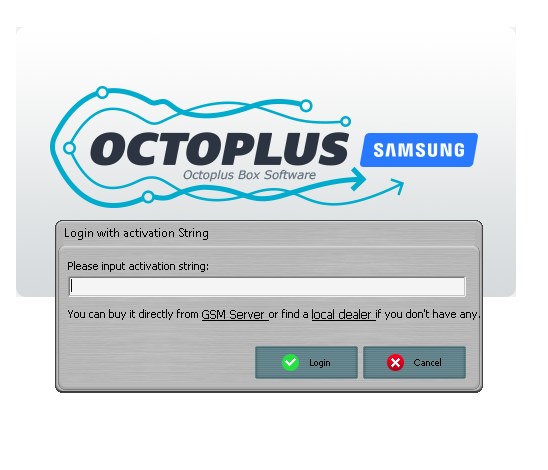
- Download and install the latest version of the Octoplus software
- Launch the software
- Use the received activation string to activate your digital license
FAQ
What is it?
Digital License is a digital product with the same functionality as activations that doesn`t require any dongle or box and is bound to your PC.
So what's the point?
You have a choice: invest in a physical carrier with unlimited usage or spend little money on a short-term license.
Besides that there is no shipping fee, so you're saving on this as well and you don't have to wait for delivery.
What options are available?
Separate licenses for LG, Samsung, Huawei, FRP and FULL all-in-one combining them all.
Are they unlimited?
No, they are limited in time. 1 day, 3 days, 3 months, 6 months, or 1 year period.
Can I upgrade 3 or 6 months license to 1 year?
Unfortunately no, that's not possible. You can arrange an exchange with your seller if you hadn't used it though.
I own a box already. Do I need this?
No, you don't
Does that means I have to pay each year to use my box?
No.
Can I activate a timed license on my box?
No, there are no possible reasons to do so. You can buy a license and use them independently if you want or buy an unlimited activation for box users.
Can I convert my box to digital unlimited license?
No, there is no such possibility
So who will need this?
New customers who don't own any product from Octoplus family yet
Is there any difference between digital license and box (dongle)?
In terms of functionality there is no difference.
Digital license is limited in time, whereas box is not. And you must be connected to the Internet all the time.
Does digital license require credits too?
Yes, there is no difference. Server based operations require the same amount of credits as for box users.
Can I buy a license for credits?
No, credits are not accepted as a payment method.
Can I use it on multiple PCs?
You can switch between PCs after 48 hrs from last HWID change.
Also, there is a limit on HWID changing:
- 3-month license - 6 times
- 6-month license - 12 times
- 1-year license - 25 times
It`s allowed to use the same license on 2 PCs without swicthing limits.
Package Contents:
- Activation Code for Octoplus Full Digital License
- 100 Octoplus Server Credits
This is a software product, delivery via email.
When we confirm your payment and process your order, we will send your activation code and detailed instructions to your email.
* The developer provides support only for those phones which are on the list of supported. Not all servicing features can be applied to some supported models, due to differences of hardware/software versions.